
By Joshua Sulser, Head of Reader Services
Finding what you are looking for can seem daunting in the robust, world-class collection of the William L. Clements Library. Students, professors, and professional researchers reach out to our staff every day for help locating items on specific topics. In this blog post I will briefly describe some methods for searching our collection and some resources that may help.
You should begin browsing the Clements collection by searching in either the finding aids or the catalog. Finding aids are your resource for locating descriptions and content lists of manuscripts and graphics collections. The catalog is your best bet for locating books – although brief descriptions of archival materials can also be found in the catalog.
The easiest way to start searching is through keywords. Type in something reasonably descriptive about your query, such as ‘French boats’, and the system will search for either of those words, in any order, anywhere within the finding aid or the catalog record. Keyword searching is likely to cast the widest net. But, you will have to wade through unhelpful results, as the search is less precise. For additional search specificity, you can define in which field you want the system to search: Title, Author, Subject, etc. To do so, select from the drop-down menu to the left of the search bar. (Image 1)
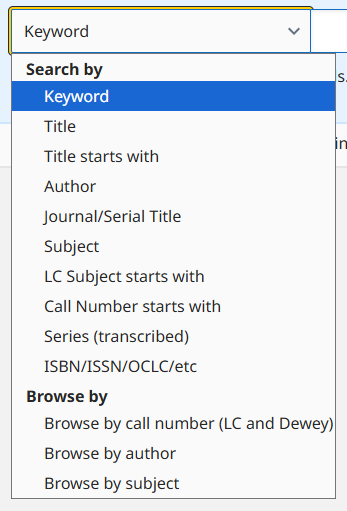
(Image 1, search fields)
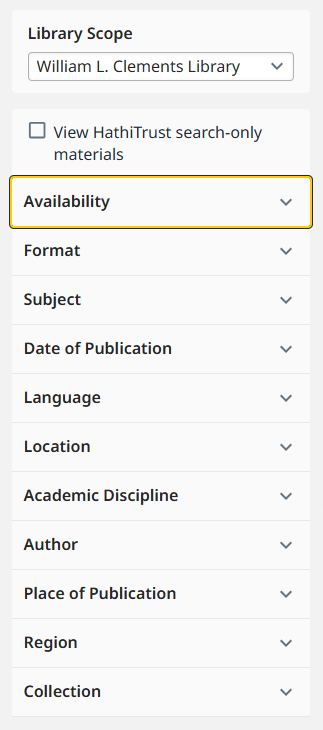
(Image 2, search filters)
There is more search magic you can perform with Boolean operators (AND, OR, NOT), punctuation (e.g., enclosing your search in quotation marks to search for exact phrase), and wildcards (such as an asterisk). I encourage you to read through the University of Michigan’s Tips for Using Library Search.
So, you’ve done a keyword, subject heading, author, title or some other search, and cast your net. To limit the pool of results further, you should adjust the scope of the search using the filters to the left of your search results. (Image 2)
Useful filters include format, subject, date, and place of publication. For example: searching for a digitized map of Mexico circa 1848, I might place an asterisk in the search bar, populating everything in our collection, and limit the results by selecting “Available Online” from the Availability filter, “Map” from the Format filter, “1840-1849” from the Date of Publication filter, and “Mexico” from the Region filter. This curated search has one result: “A new map of Mexico, California & Oregon.”
The search doesn’t have to end there! Once you click on an item record you will find various information containing hyperlinks, such as Author/Creator, Contributors, and Subjects. (Image 3)
Clicking on these hyperlinks creates a new search for items from our collection that share that piece of information in common. For instance, if I click on the Subject “Mexican War, 1846-1848 — Maps,” I generate a search of all items that also include that subject term.
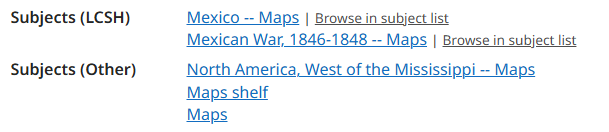
(Image 3, subject hyperlinks)
Try exploring our collection using some of these techniques. You can’t make any mistakes and might find something you didn’t know you were looking for. If you’d like some additional help locating collections, keywords, or subjects to start with, I suggest looking through our excellent research guides. Folks who can’t make it to the Clements in person should search through our wonderful digitized collections. If you are still struggling to find what you need, do not hesitate to reach out to our reference department with any questions.